
What is technical SEO?
Technical SEO determines whether Google can even crawl, index, and trust your site. No matter how great your content, poor technical implementation will destroy rankings.
Technical SEO is the foundation that determines whether Google can crawl, index, and trust your ecommerce store. In 2026, Core Web Vitals aren’t just recommendations—they’re mandatory ranking factors that directly impact your bottom line. A Largest Contentful Paint (LCP) over 4 seconds increases bounce rates by 24%, while poor Cumulative Layout Shift (CLS) signals to both users and search engines that your site lacks professionalism.
Part 2 of our comprehensive guide dives deep into the technical infrastructure every ecommerce store needs: from achieving sub-2-second LCP through edge computing and multi-layer caching, to implementing mobile-first responsive design that prioritizes the 50%+ of shoppers browsing on phones. You’ll learn how to structure your site architecture so no product sits more than 4 clicks from your homepage, optimize your crawl budget to ensure Google discovers your most valuable pages, and implement JSON-LD structured data that makes your products readable by both traditional search engines and AI Answer Engines. Without these technical foundations in place, even the best content strategy will fail to rank.
Core Web Vitals Optimization (2026 Targets)
In 2026, Core Web Vitals are non-negotiable. Google has made it clear: slow sites don’t rank, period. And on ecommerce sites, every 100ms of delay costs money—Amazon proved this decades ago.
Largest Contentful Paint (LCP) – The Loading Speed Kingpin
LCP measures how long it takes for the largest visible content (hero image, product image, main text) to load. Google’s target is ≤2.5 seconds (ideally ≤2.0s for competitive ecommerce).
Why it matters: Pages with LCP >4s have 24% higher bounce rates than pages loading in 1-3 seconds.
Implementation steps:
- Edge Computing Deployment
- Use CDN edge servers (Cloudflare Workers, Vercel Edge, AWS Lambda@Edge) to serve content from locations closest to users
- Pre-render critical pages at the edge
- Move server logic closer to users (latency reduction = faster LCP)
- Multi-Layer Caching Strategy
- Browser cache: 30+ days for static assets
- CDN cache: 1-7 days for dynamic content
- Origin cache: Database query caching, Redis for frequently accessed data
- Edge cache: Cloudflare tiered caching for fastest delivery
- Database Query Optimization
- Index frequently queried columns (product_id, category_id, user_id)
- Connection pooling to reduce connection overhead
- Query optimization: Avoid N+1 queries (select product + separately select reviews)
- Implement lazy loading for secondary content
- Server-Side Rendering (SSR) with Streaming
- Render critical product content on server before sending to browser
- Stream non-critical content (recommendations, related products) after initial load
- Reduces Time to First Byte (TTFB) for product pages
- Image Optimization
- Format: Use WebP for primary images with JPEG fallback
- Size: Optimize to <150KB per image; use responsive sizes (srcset)
- Lazy loading: Defer off-screen images
- Aspect ratio boxes: Prevent layout shifts while images load
- Multiple sizes: Serve different resolutions based on device type
- Third-Party Script Deferral
- Load tracking scripts (Google Analytics, conversion pixels) asynchronously
- Defer font loading (use system fonts for critical content)
- Load chat widgets and widgets after page interactive
- Disable or optimize third-party ads until user interaction
Real-world target for product pages: LCP ≤2.0 seconds on 4G mobile
Cumulative Layout Shift (CLS) – Visual Stability
CLS measures how much visible content shifts during page load. Google’s target is <0.1 (Good). High CLS frustrates users and signals poor technical implementation.
Common ecommerce CLS culprits:
- Product images without fixed dimensions (images load, pushing content down)
- Ads and recommendation blocks inserted dynamically
- Rating widgets loading after initial content
- Cart notifications and toast messages appearing without space reserved
Solutions:
- Reserve space for all dynamic content before it loads
- Use aspect ratio boxes:
aspect-ratio: 3/4for product images - Specify image dimensions in HTML before image loads
- Batch DOM updates to minimize layout recalculations
- Load critical images inline, defer optional images
Interaction to Next Paint (INP) – Responsiveness
INP measures how responsive your site feels to user interactions. Google’s target is <200ms. This matters enormously for ecommerce interactions: clicking “Add to Cart,” browsing product images, applying filters, adjusting quantities.
Optimization:
- Minimize JavaScript execution time (split large bundles)
- Break long tasks into smaller, 50ms chunks
- Use requestIdleCallback for non-critical work
- Optimize event listeners (debounce rapid clicks)
- Prioritize critical user interactions over background analytics
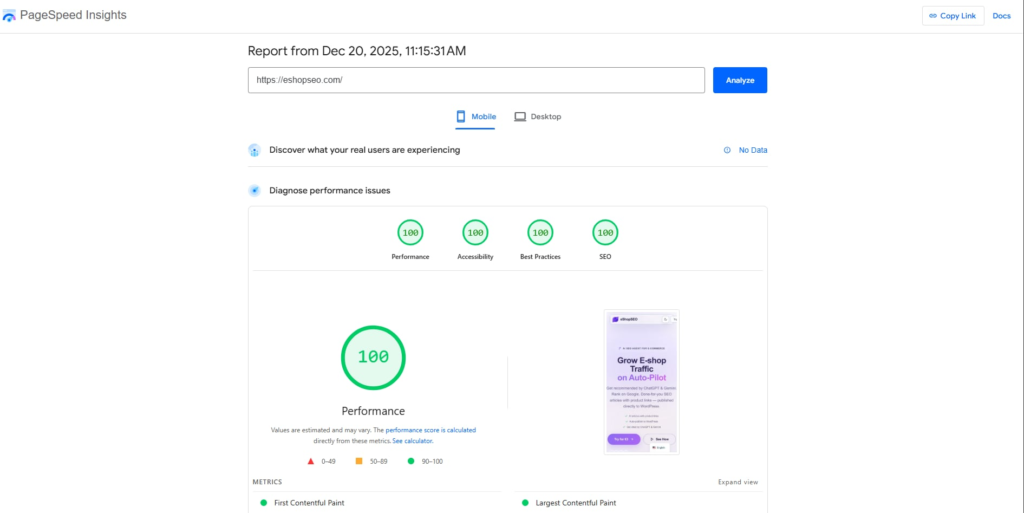
Google provides comprehensive technical guidance through PageSpeed Insights and the Core Web Vitals report in Search Console, which are essential free tools for diagnosing performance issues. For a unified view of how technical issues impact both organic rankings and paid performance, consider using AdCoon.ai’s integrated search intelligence platform to correlate Core Web Vitals data with actual ranking movements and Shopping ad visibility across your product catalog.
Site Architecture & Crawlability
Search engines crawl your site through links. Poor architecture means Google wastes crawl budget on unimportant pages instead of discovering your products.
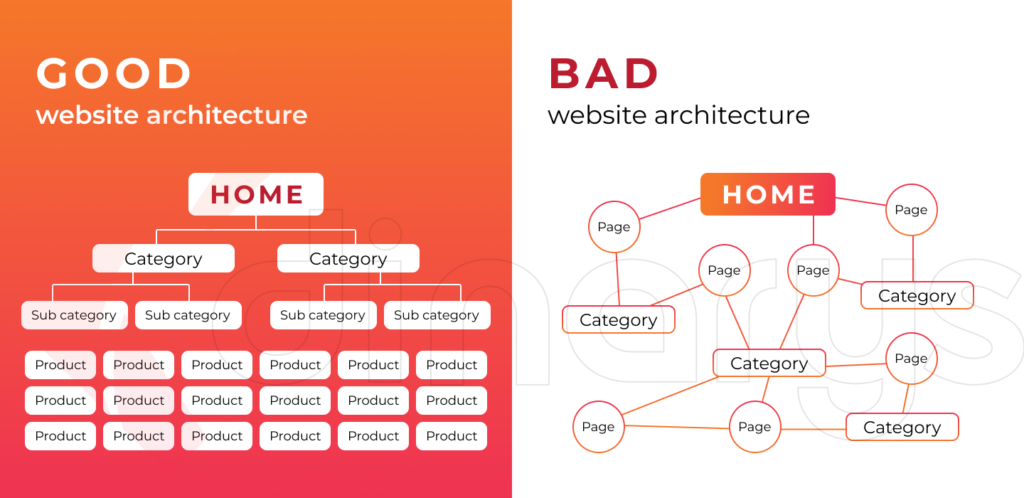
Optimal Pyramid Structure:
Homepage (1 page)
  ↓
Category Pages (10-50 pages) - "Running Shoes," "Winter Boots"
  ↓
Subcategory Pages (50-500 pages) - "Men's Running Shoes," "Women's Trail Boots"
  ↓
Product Pages (1,000-100,000+ pages) - Individual products
No product should be more than 4 clicks from the homepage.
Clean URL Structure:
✅ Good: /running-shoes/mens-asics-gel-kayano-30/
❌ Bad: /product.php?id=12345&category=5&color=black
Descriptive URLs:
- Signal topical relevance to search engines
- Are memorable and shareable
- Help users understand page content before clicking
- Support semantic SEO
URL best practices:
- Use hyphens for word separation (not underscores)
- Lowercase letters only
- Avoid numbers unless necessary
- Keep under 75 characters
- Don’t change URLs once indexed (broken links = lost ranking power)
Crawl Budget Optimization:
Google allocates a “crawl budget” per domain. Larger, more authoritative sites get higher budgets; new sites get less. Waste that budget on low-value pages, and Google won’t crawl your important products.
Optimization:
- Eliminate duplicate content (consolidate with canonicals)
- Set noindex on low-value pages (old seasonal products, filter results, print pages)
- Configure robots.txt to allow CSS, JavaScript, and image files (Google needs these to render)
- Remove or redirect broken links
- Submit XML sitemap with priority hierarchy
XML Sitemap Structure:
Include in your sitemap:
- All category pages (high priority)
- All product pages (medium-high priority)
- Important guides and content (medium priority)
- Rarely-updated pages (low priority)
Update frequency signals:
- Homepage, top categories: daily
- Product pages: weekly (when inventory changes)
- Seasonal content: when relevant
Mobile-First Indexing & Responsive Design
Google has made mobile-first indexing the default since 2021. It crawls the mobile version of your site and ranks based on mobile experience, not desktop.
50%+ of ecommerce traffic is mobile. Your mobile experience isn’t an afterthought—it’s your primary ranking signal.
Mobile Responsive Design Requirements:
- Viewport meta tag:
- Flexible layouts that adapt to screen sizes
- Readable font sizes (16px minimum for body text)
- Touch targets minimum 48×48 pixels (fingers are bigger than cursors)
- Simplified navigation with hamburger menus
- Single-column layout (no side-by-side content that requires horizontal scrolling)
Mobile-Specific Ecommerce Optimizations:
- Simplified Checkout
- 1-page or progressive checkout (no 5+ page wizard)
- Guest checkout option (don’t force account creation)
- Autofill enabled (autocomplete=”given-name”, etc.)
- One-tap payments: Apple Pay, Google Pay (40% faster)
- Minimal form fields (collect essentials, skip optional data)
- Product Image Optimization
- Zoom functionality for close product details
- Image carousel: swipe to next image
- Multiple orientations: front, back, side, detail
- 360-degree view (if technically feasible)
- Video: Product demo or unboxing video
- Filter and Sort Usability
- Sticky filter button (stays visible while scrolling)
- Collapsible filter menu (doesn’t take screen space)
- Show number of results per filter
- “Clear filters” option always visible
- Apply filters without page reload (AJAX)
- Load Performance
- Fast checkout process target: Complete in <3 seconds
- Product page load: <2 seconds on 4G
- Search results: <1.5 seconds on 4G
- Image delivery: Multiple sizes based on device (srcset)
Structured Data & Schema Markup
In 2026, structured data is mandatory for visibility. Without schema markup, AI answer engines can’t reliably extract your product information, your rich snippets won’t display, and you’re invisible to the newest search algorithms.
Critical Schema Types for Ecommerce:
1. Product Schema (Required for all product pages)
{
  "@type": "Product",
  "name": "ASICS Gel-Kayano 30 Running Shoe",
  "brand": "ASICS",
  "image": ["url1.jpg", "url2.jpg"],
  "description": "Professional running shoe with gel cushioning",
  "offers": {
    "@type": "Offer",
    "price": "129.99",
    "priceCurrency": "EUR",
    "availability": "InStock"
  },
  "aggregateRating": {
    "ratingValue": "4.8",
    "reviewCount": "2340"
  }
}
Required fields: name, image, offers (price, currency, availability)
High-impact optional: brand, color, material, size
2. Offer Schema (Price and availability)
- Current price (update daily for accuracy)
- Currency (EUR for European sites)
- Availability: InStock, InStockLimitedAvailability, OutOfStock, PreOrder
- Update in real-time to match actual inventory
3. Review & AggregateRating Schema
- Average rating (4.5/5.0)
- Number of reviews (2,340 reviews)
- Individual reviews with author, date, rating, text
4. Breadcrumb Schema (Navigation path)
{
  "@type": "BreadcrumbList",
  "itemListElement": [
    {
      "@type": "ListItem",
      "position": 1,
      "name": "Home",
      "item": "https://example.com/"
    },
    {
      "@type": "ListItem",
      "position": 2,
      "name": "Running Shoes",
      "item": "https://example.com/running-shoes/"
    }
  ]
}
5. FAQ Schema (Question-Answer structured data)
{
  "@type": "FAQPage",
  "mainEntity": [
    {
      "@type": "Question",
      "name": "Are these shoes suitable for marathons?",
      "acceptedAnswer": {
        "@type": "Answer",
        "text": "Yes. These shoes feature gel cushioning designed for 5+ hour comfort intervals. 87% of marathon runners rate these shoes 5 stars."
      }
    }
  ]
}
Always validate your structured data using Google’s Rich Results Test before publishing to production. Google’s official Product structured data documentation provides detailed specifications and examples for all required and recommended fields. For stores managing hundreds or thousands of SKUs, maintaining accurate schema at scale requires either custom development or integration with your ecommerce platform—ensuring that pricing, availability, and review data stay synchronized between your schema markup, visible page content, and Google Merchant Center feeds.
Implementation Best Practices:
- Use JSON-LD format (Google’s preferred method)
- Validate with Google’s Rich Results Test before publishing
- Keep schema aligned with visible page content (no misleading markup)
- Update dynamically (real-time pricing, inventory, reviews)
- For apparel: Include color, size, material, gender attributes
Technical SEO Checklist
Before moving to content optimization, ensure your technical foundation is solid:
- [ ] HTTPS/SSL implemented on all pages
- [ ] robots.txt configured correctly (allow CSS, JS, images)
- [ ] XML sitemap submitted in Google Search Console
- [ ] 404 errors handled gracefully (suggest related products)
- [ ] Canonical tags set up (prevent duplicate content penalties)
- [ ] hreflang tags if serving multiple regions/languages
- [ ] Core Web Vitals: LCP <2.5s, CLS <0.1, INP <200ms
- [ ] Mobile-responsive design tested on multiple devices
- [ ] Product schema implemented on all product pages (JSON-LD)
- [ ] Review schema with ratings displayed
- [ ] Breadcrumb schema on all hierarchy levels
- [ ] Paginated content: rel=”next”/rel=”prev” tags or consolidated canonicals
- [ ] Page speed tested: Google PageSpeed Insights, WebPageTest, Core Web Vitals report
- [ ] Google Search Console set up and monitored
- [ ] Sitemap regularly updated as products added/removed